Today I found a groovy new website Docufarm that lets you preview .pdf, .doc, and .ppt files without downloading them. This is a real benefit when I want to quickly view a document without loading up a different program (especially a really slow memory hog like Acrobat).
However, at least for now the website doesn't provide an easy way to preview a document that I want to view without using their Firefox extension. I'm not always using a computer that I can install extensions on, but a blog post on their site gave me a pointer that I can use to DocuFarm any document that I want without using the extension. Simply prepending the url with
http://www.docufarm.com/view.jsp?url=
will do the trick. Nifty!
Update: Docufarm now lets you copy and paste a URL directly into their search box at http://www.docufarm.com. So this hack is no longer necessary, but it might be useful if you wanted to add it to document links on your own site.
Thursday, May 24, 2007
Docufarm without the extension


Wednesday, November 08, 2006
DivX to iPod the Open Source way
So I went looking today for some info on how to convert DivX shows to an iPod compatible H.264 format. There are lots of commercial solutions out there, but I prefer to find free software. I looked for a long while and finally found Mediacoder. Here are instruction on how to convert your divx files for your video ipod in 6 easy steps.
1. Go to http://mediacoder.sourceforge.net/ and download Mediacoder
2. Install Mediacoder and run it.
3. Select Add File and add the divx file
4. Select devices button
5. Select extension->digital media player
6. Press "start" to the left of the ipod.
Shazaaam! divx to ipod. in six easy steps.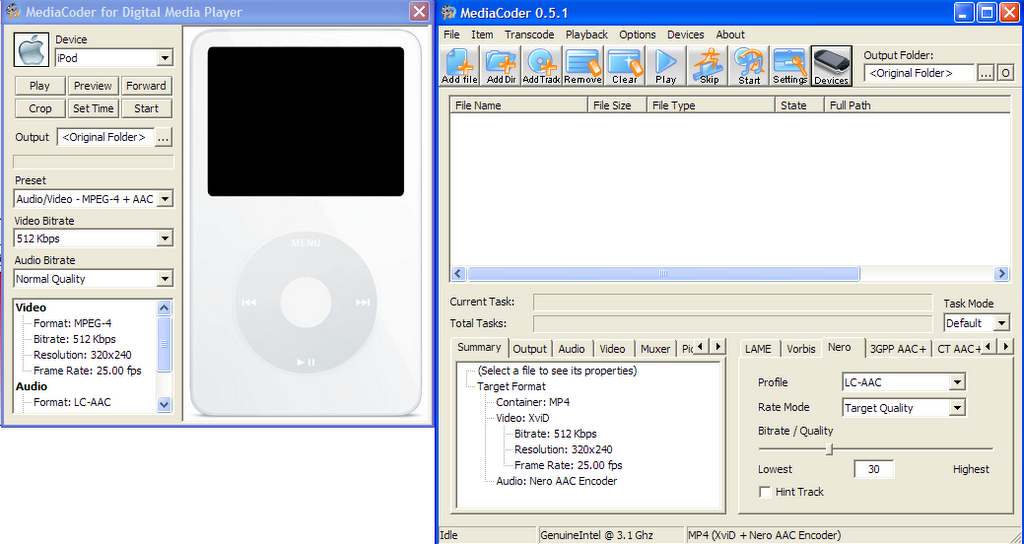
Friday, November 03, 2006
Solar Powered battery Charger
This isn't really a tip so much as a cool gadget. My dad and I have talked for a while about including a solar powered battery charger with our emergency kits. I finally found one today: Sundance Solar. Sundance solar also has a good selection of solar panels that I might use for some DIY electronics projects.
Saturday, August 05, 2006
Manually Open the Safely remove hardware window
Sometimes you need to remove an external hard drive or other piece of hardware from your Windows machine, but for some reason the little "Safely Remove Hardware" icon is missing from the System tray. With this tip you can open the Safely remove hardware window if that icon is missing.
copy and paste this into Start->Run:
RunDll32.exe shell32.dll,Control_RunDLL hotplug.dll
Monday, July 03, 2006
Show only items from Amazon.com
I occasionally shop on Amazon.com, and sometimes I find it useful to show only items from Amazon.com in order to qualify for free shipping. I found that adding this text to the end of the URL will show only items from Amazon.com.
&field-enc-merchantbin=ATVPDKIKX0DER
 , and sometimes I find it useful to show only items from

