Today I registered for a local engineering conference. Although my registration was free, for some reason their eCommerce site wanted a credit card number. Well, I don't particularly care to give my credit card out to just anyone on the internet, so what do I do, and why does their site want my credit card number if they aren't planning to charge it for anything?
Of course, I did the only reasonable thing a security concious engineer could do, I did a quick search for "fake visa number generators" on the internet and found this gem of a site:
http://www.darkcoding.net/index.php/credit-card-numbers/
Then, I took the first number off of the list, made up an expiration date and CVV number, and tried it out. Two pages later I got a lovely confirmation stating that my registration had been accepted.
Friday, October 05, 2007
Fake Credit Card Numbers


Thursday, October 04, 2007
To scrape or not to scrape?
Recently Zap2It, the company which had been providing XML
I always have a hard time forking over money for something that I can get for free elsewhere, and in the wake of the labs.zap2it.com closure several enterprising individuals have developed programs which scrape TV listings from commercial websites. One of these is a PERL program called Zap2XML. I can report that the program works great, and there are even a couple of setup guides floating around around that target MythTV users.
However, the use of the program in my opinion constitutes a bit of a moral and ethical dilemma. You see there is the little problem of the fact that when I signed up for a free Zap2it.com account, I agreed to their Terms of Service which say "You may not scrape or otherwise copy our Content without permission" which technically prohibits me from scraping their website. However, their TOS also says, "you may download or print a single copy of any portion of the Content solely for your personal, non-commercial use". I believe that even though they prohibit me from scraping their website for listings with a program like Zap2XML, that as long as I am using it only for "personal, non-commercial use" that I am probably ok.
I believe that their reason for prohibiting scraping is two-fold. One, it prevents other websites from scraping Zap2It's TV listings (which they paid TMS a lot of money for) and then rebranding the content and displaying elsewhere. I am clearly not doing this, but the second reason is an even bigger moral dilemma. You see Zap2It (as well as 90% of the rest of the internet) depends upon advertising revenues to cover at least part of the cost of their doing business, and when I use a program like Zap2XML to scrape listings from their website I am obtaining content from them without viewing their advertising. Some people have argued that this is stealing, and this leads into the even bigger question of the morality behind online advertising and ad blockers such as Adblock Plus which is a whole other ball of wax that I don't really want to get into right now, but suffice it to say that I believe that there is some validity to arguments on both sides of the issue
I believe that this issue is the second reason why Zap2It specifically prohibits scrapers. They are providing content that costs them money to produce. Additionally there are costs involved in bandwidth and servers, and they believe that they have a right to recover part of those costs through advertising revenues. Now, I am not opposed to their collecting ad revenues from my viewing of their website, but I also feel like I have the right to select which content I view and how I view it, and so for now I am using Zap2XML.
Anyways, I just thought that I would throw some of this issue out there and see how my readers feel about this issue. Please feel free to post any and all comments or opinions that you might have on the morality and ethics behind this issue.
Monday, September 24, 2007
Mozy Online Backup: Simple, Automatic, Secure
I installed the Mozy backup client a while ago and never thought twice about it silently backing up my files. Fast forward to last week when I tried installing the Enigmail extension for Thunderbird. I originally installed Enigmail so that I could exchange encrypted emails with a Client who insisted on using GPG instead of S/MIME.
The Enigmail installation monkeyed around with lots of my Thunderbird settings including adding an extra link to download IMAP messages from the server that I had to click everytime that I wanted to read a message. After messing around with things for a few minutes, I decided to give up on Enigmail and ditch it in favor of FireGPG. However, even after uninstalling Enigmail the problems persisted. I probably could have figured out how to get everything back to normal, but my Thunderbird was almost unusable as it was and I just wanted my email program back to normal.
For a moment I pondered with dread what it would take to reinstall Thunderbird and redo all of the customization I had done to personalize the app over the last three years, when suddenly I realized that this was a perfect time to try out a restore from Mozy. Fortunately I had included my Thunderbird directory in my Mozy backup set, so I did a quick restore of my prefs.js file, and when I restarted Thunderbird, lo and behold, everything was back to normal. Here are the steps that I followed in case someone else needs to do the same thing.
- I shutdown Thunderbird so that it wasn't running.
- I opened the Mozy Virtual Drive in My Computer.
- I navigated to the Mozilla Thunderbird profile directory. (C:\Documents and Settings\
\Application Data\Thunderbird\Profiles\) - I right clicked on the profile folder and chose "Change Time..." to select yesterday's backup.
- I right clicked on the "prefs.js" file and chose "Restore" to restore the old file over the new file.
- I restarted Thunderbird and everything was back the way it should be.
Here is what some other people are saying about Mozy
Walter S. Mossberg, The Wall Street Journal
Larry Armstrong, BusinessWeek
Friday, September 21, 2007
Lots and lots of tabs
One of the things that I love most about Firefox is tabbed browsing. Most day I have between 10-20 tabs open. I don't know that I'm quite what you would call a tabaholic (maybe I'm still in denial), but I definitely have a problem. Tab scrolling in Firefox 2 is utterly worthless in my opinion. I mean what's the point if I can't see all of my lovely tabs at once. I tried the Vertigo extension, but the vertical tabs just didn't do it for me. Then, today, during another one of my marathon development/working/surfing sessions I discovered by the How to Geek that clued me in to the Tab Mix Plus extension. Now I can have my tabs arranged in multiple rows so that I can have my tabs and see them too.
Thursday, May 24, 2007
Docufarm without the extension
Today I found a groovy new website Docufarm that lets you preview .pdf, .doc, and .ppt files without downloading them. This is a real benefit when I want to quickly view a document without loading up a different program (especially a really slow memory hog like Acrobat).
However, at least for now the website doesn't provide an easy way to preview a document that I want to view without using their Firefox extension. I'm not always using a computer that I can install extensions on, but a blog post on their site gave me a pointer that I can use to DocuFarm any document that I want without using the extension. Simply prepending the url with
http://www.docufarm.com/view.jsp?url=
will do the trick. Nifty!
Update: Docufarm now lets you copy and paste a URL directly into their search box at http://www.docufarm.com. So this hack is no longer necessary, but it might be useful if you wanted to add it to document links on your own site.
Wednesday, November 08, 2006
DivX to iPod the Open Source way
So I went looking today for some info on how to convert DivX shows to an iPod compatible H.264 format. There are lots of commercial solutions out there, but I prefer to find free software. I looked for a long while and finally found Mediacoder. Here are instruction on how to convert your divx files for your video ipod in 6 easy steps.
1. Go to http://mediacoder.sourceforge.net/ and download Mediacoder
2. Install Mediacoder and run it.
3. Select Add File and add the divx file
4. Select devices button
5. Select extension->digital media player
6. Press "start" to the left of the ipod.
Shazaaam! divx to ipod. in six easy steps.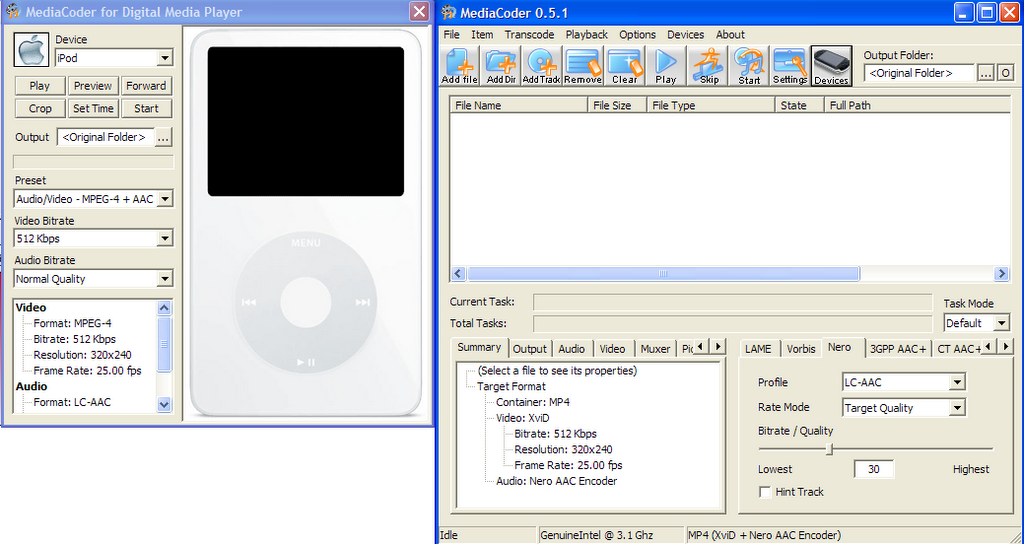
Friday, November 03, 2006
Solar Powered battery Charger
This isn't really a tip so much as a cool gadget. My dad and I have talked for a while about including a solar powered battery charger with our emergency kits. I finally found one today: Sundance Solar. Sundance solar also has a good selection of solar panels that I might use for some DIY electronics projects.

